

UI node reference
This page documents the complete Public Beta wire-node construction API in @ephemeral-ai/mayfly-ui. A ui.* builder only constructs, copies, and freezes renderer-neutral data. The Mayfly renderer owns validation, layout, themes, width, focus, input routing, and event dispatch. The plugin still owns domain data, native effects, and authoritative data snapshots.
For how node trees are organized and controlled state flows, see the companion Component model guide.
import type { MayflyUiActionEvent, MayflyUiEventContext, MayflyUiObservationEvent } from '@ephemeral-ai/mayfly-ui'
import { ui } from '@ephemeral-ai/mayfly-ui'
Responsibility boundary
| Mayfly owns | The plugin owns |
|---|---|
| Rendering text, tabs, lists, forms, actions, and the other nodes | Node data and product copy |
| Drafts, selections, pages, operations, and feedback for the registration | Domain facts and calls to the owning native service/action |
| Theme mapping, width degradation, focus, and navigation | Data-snapshot baselines, source stamps, and scope |
| Event classification, reply admission, ack publication, and lifecycle fencing | Structured action replies and handle set() calls for external data |
Nodes never accept renderer callbacks, raw keys, terminal coordinates, ANSI, or focus handles. Do not place I/O, Agent, Session, or mutable renderer objects in a node.
Shared rules and limits
- A tree may contain at most 256 nodes, with the root at depth 0 and maximum depth 8. Any array may contain at most 200 entries. Content text —
text,markdown,code,diff,diagram, rich-text spans, and string list bodies — has no size limit: the renderer reads only the rows in view. Ids and keys may be at most 1,024 UTF-16 code units; a longer one is rejected. One-row fields — labels, titles, badges, details, reasons, hints, placeholders, chart labels,alt, and each span of afieldsvalue — are clipped at 4,096 code units and end in…. A line break inside afieldslabel or value becomes one space. - Text that grows — a streamed answer, job output, a live log — publishes as a
chunkslist on thetext,markdown,code, ordiagramfield itself (MayflyContentFieldisstring | readonly MayflyContentChunk[]): up to 10,000ui.chunk(text)snapshots, exempt from the 200-entry collection cap. Append by republishing the same chunk objects plus the new one — admission validates each chunk once per identity, and a piece that ends mid-line joins the next on one row.textOf(field)joins the field's text explicitly. - Builders recursively copy and freeze inputs and reject cycles. Host admission accepts only plain objects and dense arrays and strips ANSI, C1, and unsafe control characters.
- A tree may contain at most 8
imagenodes. Animagenode'sattachmentIdis 1 to 128 characters and itsmaxRowsis an integer from 1 to 40. - Numeric layout fields are non-negative safe integers.
minSizecannot exceedmaxSize, and viewport minimums cannot exceed their matching maximums. - Tabs/list/form/prompt control ids, form field ids, action item ids, and form/loader submit or cancel ids must not collide in one interactive tree. Tab and list item ids must at least be unique within their node; ids used as controls cannot be empty.
toneis semantic, not a color value:default | muted | accent | success | warning | danger.emphasisisnormal | strong; omission means normal text.- Identity is the cache key. A node that reaches the renderer is a frozen snapshot, and an unchanged subtree costs nothing on republish: keep unchanged sub-nodes identical instead of rebuilding them, or give a component
memo: true.memocompares props by reference, so it hits only when every prop is stable, a translator passed asMayflyTranslateincluded; see Public UI kit.
The defaults below describe the current Mayfly TUI in 0.1.4-rc.1. The wire contract promises field semantics, not exact border glyphs, color values, or key bindings.
Migrating from alpha.3
- Split
onEvent(event, context)intoonEvent.observeandonEvent.action. - Replace
selection-changewith observationselection-toggleor actionselection-accept; every event carriespagePath. - Remove plugin-owned form/tab/list drafts, pending confirmation, and renderer cursors. Node values are initial/data baselines.
- Return a structured settlement from every action handler. Read submitted forms and selections from
event.submission, not a flatvaluesobject. - Remove
set(node, { eventRevision }). Usereason: 'data'for external refresh andreason: 'replace'for a new instance. Only the registration-bound publisher creates acknowledgements.
Content nodes
text

A single-line hint in the danger tone (width 48).
ui.text(content: MayflyContentField, options?: {
  tone?: MayflyTone
  overflow?: 'wrap' | 'truncate' | 'middle' | 'start'
  styles?: readonly ('strong' | 'italic' | 'strike')[]
})
A semantic text block that the renderer may wrap — use it for status hints, result summaries, and other explanatory copy. An omitted tone uses the theme's normal text color. The screenshot above renders exactly this node:
ui.text('Connection lost', { tone: 'danger' })All six tones side by side:
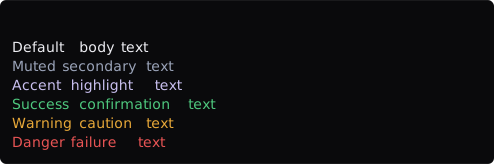
default, muted, accent, success, warning, and danger (width 56).
ui.stack.column([
  ui.text('Default body text'),
  ui.text('Muted secondary text', { tone: 'muted' }),
  ui.text('Accent highlight text', { tone: 'accent' }),
  ui.text('Success confirmation text', { tone: 'success' }),
  ui.text('Warning caution text', { tone: 'warning' }),
  ui.text('Danger failure text', { tone: 'danger' }),
])
Long text wraps at the allocated width instead of clipping:
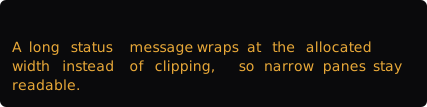
The same warning text occupies three rows at width 48.
ui.text('A long status message wraps at the allocated width instead of clipping, so narrow panes stay readable.', { tone: 'warning' })overflow: 'truncate' keeps the node to exactly one row instead: line breaks and tabs fold to spaces and the tail ends in …. Use it for dense rows in a bottom pane, where a wrapped row would cost the dock a line:
ui.text(`${label} · ${activity}`, { tone: 'muted', overflow: 'truncate' })overflow: 'middle' and 'start' also keep one row, but elide the middle or the start instead of the end, so the distinguishing end of a path or a title stays visible. styles takes 'strong', 'italic', and 'strike', as a span does:
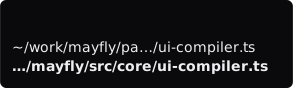
A path elided in the middle, and the same path elided at its start in bold (width 32).
ui.stack.column([
  ui.text('~/work/mayfly/packages/mayfly/src/core/ui-compiler.ts', { overflow: 'middle' }),
  ui.text('~/work/mayfly/packages/mayfly/src/core/ui-compiler.ts', { overflow: 'start', styles: ['strong'] }),
])
richText

A muted prefix followed by a strong accent model name (width 64).
ui.richText(spans: readonly MayflyInlineSpan[], options?: { overflow?: 'wrap' | 'truncate' })

type MayflyInlineSpan = {
  text: string
  tone?: MayflyTone
  emphasis?: 'normal' | 'strong'
  motion?: 'shimmer' | 'loader'                        // one channel per rich-text row
  variant?: 'bloom' | 'fill' | 'gap' | 'breath' | 'pulse'        // with motion: 'loader'; default 'gap'
}
Combines tone and emphasis within one text block — ideal for "label + highlighted value" inline mixes. The renderer wraps the text (or, with overflow: 'truncate', keeps one ellipsized row like text); the plugin must not assemble ANSI. The screenshot above renders exactly this node:
ui.richText([
  { text: 'Model ', tone: 'muted' },
  { text: 'deepseek-chat', tone: 'accent', emphasis: 'strong' },
])
Tone and emphasis compose into longer mixed passages:

Muted narration, a strong accent path, a strong number, and a danger tail (width 56).
ui.richText([
  { text: 'Rebuild of ', tone: 'muted' },
  { text: 'packages/mayfly', tone: 'accent', emphasis: 'strong' },
  { text: ' failed after ', tone: 'muted' },
  { text: '42s', emphasis: 'strong' },
  { text: ' with 2 errors', tone: 'danger' },
])
A span may move. motion: 'shimmer' sweeps a three-letter window over the letters of its text (primary and bold over muted letters); motion: 'loader' is one animated loader cell (its text must be '') in the given variant. A row carries at most one motion channel, and a status node carries none. The renderer owns the clock (a 100 ms step, the breath moving every fourth step), a tick repaints only the row that holds the span, and reduced motion freezes the channel on its first frame, which is also what a screenshot shows:

A shimmering label and a breathing cell, both at their first frame (width 48).
ui.stack.column([
  ui.richText([{ text: 'Running commands', motion: 'shimmer' }, { text: ' · 12s', tone: 'muted' }]),
  ui.richText([{ text: '', motion: 'loader', variant: 'breath' }, { text: ' Waiting for authorization', tone: 'muted' }]),
])
fields

Two label/value rows, the status value in the success tone (width 64).
ui.fields(rows: readonly {
  label: string
  value: readonly MayflyInlineSpan[]
}[])
Represents compact label/value information such as session metadata or an environment summary. value is always an array of spans, not an arbitrary MayflyUiNode. The screenshot above renders exactly this node:
ui.fields([
  { label: 'Status', value: [{ text: 'Ready', tone: 'success' }] },
  { label: 'Model', value: [{ text: 'deepseek-chat' }] },
])
Across multiple rows, each value can compose several spans for emphasis:
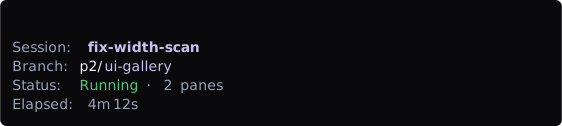
Four rows: a strong accent session name, a two-tone branch, a composed status, and a muted duration (width 64).
ui.fields([
  { label: 'Session', value: [{ text: 'fix-width-scan', tone: 'accent', emphasis: 'strong' }] },
  { label: 'Branch', value: [{ text: 'p2/' }, { text: 'ui-gallery', tone: 'accent' }] },
  { label: 'Status', value: [{ text: 'Running', tone: 'success' }, { text: ' · 2 panes', tone: 'muted' }] },
  { label: 'Elapsed', value: [{ text: '4m 12s', tone: 'muted' }] },
])
code
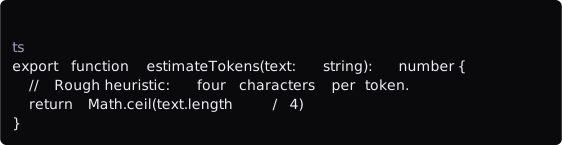
A multi-line code block with the ts language hint (width 64).
ui.code(value: MayflyContentField, options?: { language?: string, numbered?: boolean, start?: number })Represents code or preformatted text such as patch fragments, command output, or configuration content. A recognized language is highlighted by default: keywords in primary, strings in success, comments muted, and everything else in the text color; highlighting covers the first 12 rows of a block of at most 32 KB, and the rest is plain text. The screenshot above renders exactly this node:
ui.code([
  'export function estimateTokens(text: string): number {',
  '  // Rough heuristic: four characters per token.',
  '  return Math.ceil(text.length / 4)',
  '}',
].join('\n'), { language: 'ts' })
numbered: true draws a muted n │ gutter, counting from start (default 1, for a window of a longer text); a wrapped line's continuation rows stay under its code:
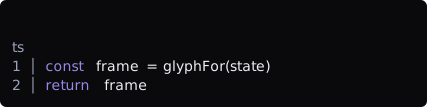
Two numbered lines (width 48).
ui.code('const frame = glyphFor(state)\nreturn frame', { language: 'ts', numbered: true })diff
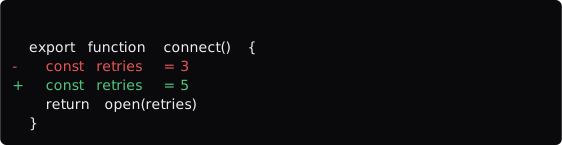
Multi-line before/after: one line-number column (old numbers on removed lines, new numbers on the rest), changed lines marked −/+ with red/green bands behind the code only (width 64).
ui.diff(before: string, after: string, options?: {
  start?: number      // the number of the first line after the change (default 1)
  beforeStart?: number // the number of the first line before the change (default: start)
  numbered?: boolean  // a line-number gutter (default true)
  numberWidth?: number // the least width of the number column, so diffs shown together share a gutter (default 1)
  hunkHeader?: boolean // an `@@` header even for one hunk (default: more than one)
  context?: number    // unchanged lines around a change, 0 to 3 (default 1)
  maxRows?: number    // then `… +N rows · Ctrl+O`
})
Represents the semantic before/after states of the same content, such as a pending edit. Supply plain text rather than manually adding diff colors: Mayfly draws one muted line-number gutter (ending in │; a removed line shows its number before the change, any other line its number after it), marks removed and added lines with −/+, and shades their code (never the gutter) with the theme's diffRemovedBg/diffAddedBg bands. One unchanged line stays around each change, a skipped run reads as one muted ⋯, and a long line ends in …. The screenshot above renders exactly this node:
ui.diff(
  ['export function connect() {', '  const retries = 3', '  return open(retries)', '}'].join('\n'),
  ['export function connect() {', '  const retries = 5', '  return open(retries)', '}'].join('\n'),
)
The options number the lines from start, name the hunk with an @@ header, widen or drop the context, and cap the rows:
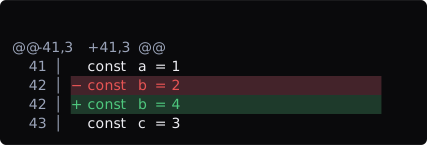
Numbering from line 41 with a hunk header (width 48).
ui.diff(
  ['const a = 1', 'const b = 2', 'const c = 3'].join('\n'),
  ['const a = 1', 'const b = 4', 'const c = 3'].join('\n'),
  { start: 41, hunkHeader: true, context: 1 },
)
sections

One expanded section and one collapsed section side by side (width 64).
ui.sections(sections: readonly {
  title?: string
  body: MayflySectionContentNode
  collapsed?: boolean
}[])
Each body is restricted to the lightweight section-content union: text | fields | code | diff | sections. It cannot directly contain tabs, forms, actions, or another full MayflyUiNode. Omitting collapsed is equivalent to false. With true, the current TUI shows only the section title, or an ellipsis when no title exists. This is static presentation state and does not produce an expand/collapse event. The screenshot above renders exactly this node:
ui.sections([
  {
    title: 'Environment',
    body: ui.fields([
      { label: 'Node', value: [{ text: 'v24.15.0' }] },
    ]),
  },
  {
    title: 'Raw transcript',
    body: ui.text('Hidden until expanded.'),
    collapsed: true,
  },
])
markdown and diagram
ui.markdown(source: MayflyContentField)
ui.diagram(mermaidSource: MayflyContentField)
Markdown reuses Mayfly's pi-tui adapter, including tables and fenced code. Mermaid is rendered as terminal Unicode through beautiful-mermaid; closed mermaid fences in assistant messages use the same path. Parse failures, unsupported or over-wide diagrams, graph/source/output complexity quotas, and labels containing CJK, emoji, or other full-width characters remain visible as the original Mermaid code fence. The complexity admission keeps large graphs from blocking the terminal render loop. Diagrams are never wrapped or truncated.
ui.diagram('flowchart TD\n Request --> Validate\n Validate --> Result')markdown and diagram are available in ordinary panes and overlays. It is not a status, editor-extension, or sections.body node.
chart
chart carries data rather than renderer options. Mayfly adapts it through simple-ascii-chart, maps semantic tones through the active theme, and falls back to a bounded textual summary when a chart cannot fit.
ui.chart({
  chart: 'line' | 'point',
  title?: string,
  xLabel?: string,
  yLabel?: string,
  height?: number, // 4..20
  series: [{
    id: string,
    label?: string,
    tone?: MayflyTone,
    points: [{ x: number, y: number | null }],
  }],
})

ui.chart({
  chart: 'bar',
  layout?: 'grouped' | 'stacked' | 'normalized',
  // 'horizontal' requires layout: 'normalized': each category renders as a
  // `height`-row (default 10) grid of `ceil(100/height)` proportional cells —
  // each cell ~1%, painted two columns wide; every non-zero share keeps at
  // least one cell; a series flagged empty: true paints '░' empty track.
  orientation?: 'vertical' | 'horizontal',
  title?: string,
  yLabel?: string,
  height?: number, // 4..20
  // A vertical chart draws one column group per category on an axis from zero
  // (a rounded top, a middle, zero), with eighths on top; more categories than
  // columns merge neighbours (their values add).
  yFormat?: 'compact', // y labels as 420.8M, 12k
  legend?: false, // leaves out the series legend under the x labels
  categories: readonly string[],
  series: [{ id: string, label?: string, tone?: MayflyTone, empty?: boolean, values: readonly (number | null)[] }],
})

ui.chart({ chart: 'sparkline', values: [2, 4, null, 7], label: 'Load', tone: 'warning' })

ui.chart({
  chart: 'heatmap',
  columns: ['Linux', 'macOS'],
  rows: ['Node 22'],
  values: [['pass', 'fail']],
  levels: [
    { value: 'pass', label: 'Passed', tone: 'success' },
    { value: 'fail', label: 'Failed', tone: 'danger' },
  ],
})
A heatmap is drawn by Mayfly itself: a title, a header of column names, one row of cells per row label, and the legend row. cell: 2 (the default) paints each value as two cells (░░ ▒▒ ▓▓ ██, ░░ ▒▒ ██ for three levels) under names padded to four columns; cell: 1 paints one cell with no gap (· ░ ▒ ▓ █), so a year of days fits a row, and columnLabels (one per column) are written where their column starts, as month names are. A value with no level is blank, and a row wider than the room is clipped. A sparkline is one row: the muted label, then eight-step cells scaled to the tallest value, in the node's tone (accent by default).
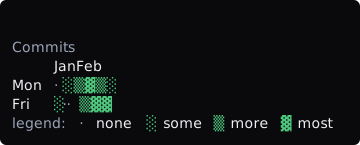
One-cell mode with month labels (width 40).
ui.chart({
  chart: 'heatmap',
  cell: 1,
  title: 'Commits',
  columns: ['w1', 'w2', 'w3', 'w4', 'w5', 'w6'],
  columnLabels: ['Jan', '', '', 'Feb', '', ''],
  rows: ['Mon', 'Fri'],
  values: [[0, 1, 2, 3, 2, 1], [1, 0, 0, 2, 3, 3]],
  levels: [
    { value: 0, label: 'none', tone: 'muted' },
    { value: 1, label: 'some', tone: 'success' },
    { value: 2, label: 'more', tone: 'success' },
    { value: 3, label: 'most', tone: 'success' },
  ],
})
Values must be finite; null marks missing data. Series ids and heatmap level values are unique, bar values match the category count, and heatmap dimensions match their row/column labels. Each chart accepts at most 20 series, and one tree accepts at most 4,000 chart cells. Like document, chart is available in ordinary panes and passive or capturing overlays, not in narrower status, status, editor-extension, or section-content trees.
Layout nodes
child

Width 64 satisfies minWidth: 48, so the detail renders.
ui.child(node: MayflyUiNode, options?: {
  tab?: { controlId: string, itemId: string }
  basis?: number | 'auto'
  grow?: number
  shrink?: number
  minSize?: number
  maxSize?: number
  when?: {
    minWidth?: number
    maxWidth?: number
    minHeight?: number
    maxHeight?: number
  }
  priority?: number                      // admission order in a row; lower is kept first
  band?: 'left' | 'center' | 'right'     // where an admitted child sits (default left)
  overflow?: 'truncate' | 'hide'         // what a child that does not fit does
})
Plain nodes can enter a stack directly. Wrap a node in ui.child() only when it needs sizing hints or a responsive condition. Sizes are hints along the current stack direction, not fixed terminal row or column promises. when uses the actual viewport allocated to the current surface. When a condition stops matching, the node and its controls leave the tree and Mayfly reconciles focus. A child is only valid as a stack member; both screenshots render exactly this node:
ui.stack.column([
  ui.text('Session overview'),
  ui.child(ui.text('Wide-only detail'), { grow: 1, when: { minWidth: 48 } }),
])
The same node at width 40: the condition no longer holds, the detail leaves the tree, and only the heading row remains:

Width 40 fails minWidth: 48; Wide-only detail leaves the tree.
tab gives a child a stable page identity under a tabs control. Only the active page is visible, and hidden pages retain their existing form/list state. It is unavailable in status or editor-decoration trees.
stack.row / stack.column

A row with a gap nested inside a column (width 64).
ui.stack.row(children, options?)
ui.stack.column(children, options?)

type StackOptions = {
  gap?: 0 | 1 | 2
  align?: 'stretch' | 'start' | 'center' | 'end'
}
row expresses horizontal placement and column expresses vertical placement. The current TUI uses gap 0 and stretch alignment when omitted. A renderer may safely degrade spatial layout on a surface without spatial layout, so do not depend on absolute child coordinates. The screenshot above renders exactly this node:
ui.stack.column([
  ui.stack.row([ui.text('left'), ui.text('right')], { gap: 1 }),
  ui.text('below'),
])
Combined with ui.child()'s grow, a row splits its width proportionally:

grow: 1 and grow: 2 split the row width 1:2 (width 64).
ui.stack.row([
  ui.child(ui.surface({ chrome: 'lane', child: ui.text('grow 1') }), { grow: 1 }),
  ui.child(ui.surface({ chrome: 'lane', child: ui.text('grow 2') }), { grow: 2 }),
], { gap: 1 })
A row whose children carry a priority admits them instead of laying them out by size. The children are admitted in priority order (ties keep their position) while they fit, a gap of gap (2 by default) between them. A child that does not fit takes the room that is left when it says overflow: 'truncate' (at least 8 cells, and the row is then full), drops out when it says overflow: 'hide' while later children may still fit, and otherwise ends admission: it and every later child drop. Admitted children sit in their band; the right band is flush with the edge and the center band is centered between its neighbours. Only the first row of a child is drawn. Mayfly's status rows use the same rule, so a plugin entry and a Mayfly entry are admitted alike:

Width 64: the right-hand cache 34% is kept, and the path truncates into the room that is left.
ui.stack.row([
  ui.child(ui.richText([{ text: 'deepseek-chat High' }]), { priority: 0 }),
  ui.child(ui.richText([{ text: 'PLAN', tone: 'primary', styles: ['strong'] }]), { priority: 1 }),
  ui.child(ui.richText([{ text: 'cache 34%', tone: 'muted' }]), { priority: 4, band: 'right', overflow: 'hide' }),
  ui.child(ui.richText([{ text: '~/work/mayfly/packages/mayfly', tone: 'muted' }]), { priority: 5, overflow: 'truncate' }),
], { gap: 2 })
The same node at width 30: cache 34% no longer fits and hides, and the path is left fewer than eight cells, so the row ends at PLAN.
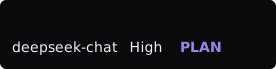
Width 30.
surface
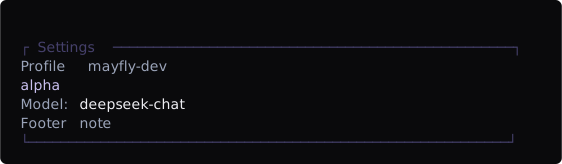
Title, subtitle, badges, surface border chrome, padding, and a footer in one container (width 64).
ui.surface({
  title?: string
  subtitle?: string
  badges?: readonly MayflyInlineSpan[]
  chrome?: 'none' | 'lane' | 'surface' | 'overlay'
  padding?: 0 | 1 | 2
  child: MayflyUiNode
  footer?: MayflyUiNode
  titleAlign?: 'left' | 'right'
  border?: MayflyTone
  escapeLabel?: 'close' | 'back' | 'cancel' | 'reject' | 'leave'
  hint?: 'auto' | 'none' | 'completions'
})
surface combines heading metadata, body content, and an optional footer.
| Field | Meaning |
|---|---|
title | Primary heading |
subtitle | Muted supporting line after the heading |
badges | Semantic spans at the right of the title rule (dropped first when narrow) |
chrome | Border intent; defaults to none. overlay and surface are one rounded frame with the title inset in its top rule (╭ Title ─── badge ╮), the overlay in the focus border color and the surface in the quiet border color; lane is rules only; none is a bold title |
padding | Content inset level; defaults to 0. A framed chrome keeps at least one column inside its border |
child | Required body |
footer | Optional node between the body and bottom border |
titleAlign | right puts the title in the top-right corner with the badges at the left; a title too long for the rule loses its start, so the end of a path stays |
border | The border tone; the chrome's own color otherwise |
escapeLabel | The word the Esc hint shows, and what Esc does once nothing inside has taken it: it asks the host to close the surface (reject dismisses it as a rejection) |
hint | none draws no key-hint row; completions draws one only while the editor's completion list is open |
chrome: 'overlay' is only a visual intent. It does not create an overlay; use api.overlays.open() for the actual surface. When that surface is the registration root, core coalesces it with the registration title into one frame. Ordinary overlays and presentation: 'editor' both honor maxHeight. When it is undeclared, ordinary overlays take at most one third of the terminal height and editor presentations at most half, with a ten-row floor. Short content keeps its natural height instead of stretching to that limit. The screenshot above renders exactly this node:
ui.surface({
  title: 'Settings',
  subtitle: 'Profile mayfly-dev',
  badges: [{ text: 'alpha', tone: 'accent' }],
  chrome: 'surface',
  padding: 1,
  child: ui.fields([
    { label: 'Model', value: [{ text: 'deepseek-chat' }] },
  ]),
  footer: ui.text('Footer note', { tone: 'muted' }),
})
chrome: 'lane' is the lighter variant: the title sits inside a top rule with no full border:

Lane chrome: the title embedded in a top rule (width 64).
ui.surface({
  title: 'Context',
  chrome: 'lane',
  child: ui.text('Lane chrome body'),
})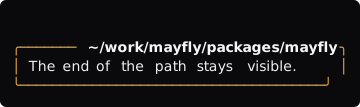
A right-aligned title with a border tone (width 40).
ui.surface({
  title: '~/work/mayfly/packages/mayfly',
  titleAlign: 'right',
  chrome: 'surface',
  border: 'warning',
  badges: [{ text: 'dirty', tone: 'warning' }],
  child: ui.text('The end of the path stays visible.'),
})
scroll
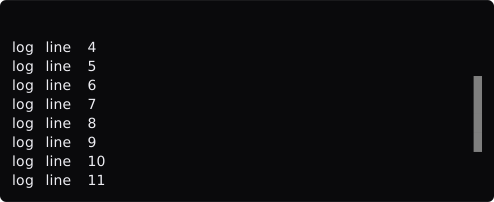
Sixteen lines in an eight-row viewport after scrolling down three rows, with the scrollbar: true thumb visible (width 56).
ui.scroll(node: MayflyUiNode, options?: {
  id?: string
  follow?: 'none' | 'start' | 'end'
  scrollbar?: boolean
  height?: number
  expandedHeight?: number
  fit?: boolean
  pill?: boolean
})
follow expresses the desired position after refresh; omission behaves as none. With an id, the frontend owner stores a semantic content-block and character-offset anchor, so data insertion, width changes, and renderer rebuilds restore the same position. follow: 'end' stays attached to appended content. Interactive surfaces in both main and alternate modes use the height supplied by their parent layout. A passive main-mode transcript scroll is linearized and delegated to the outer transcript viewport. scrollbar: true requests a visible scrollbar. Nested scroll nodes are rejected. The screenshot above renders exactly this node:
ui.scroll(
  ui.stack.column(Array.from({ length: 16 }, (_, index) => ui.text(`log line ${index + 1}`))),
  { scrollbar: true },
)
Naming height, expandedHeight, fit, or pill gives the scroll its own viewport: exactly height rows (6 by default), expandedHeight rows (14) while Ctrl+E has expanded it, and a scrollbar column beside the content (a █ thumb on a ░ track, unless scrollbar: false). The surface around it keeps its natural height instead of stretching to fill the terminal. fit shrinks the viewport to short content and draws no scrollbar until the content overflows. pill draws ↓ N new · End over the last row while the view is scrolled away from a followed tail and N rows have arrived since; End jumps back. The place a user scrolled to survives a republish. With an id, the same anchors as above keep it.
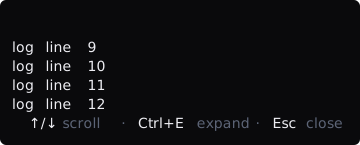
Twelve lines in a four-row viewport that follows the tail (width 40).
ui.scroll(
  ui.stack.column(Array.from({ length: 12 }, (_, index) => ui.text(`log line ${index + 1}`))),
  { height: 4, follow: 'end', pill: true },
)
Controlled interactive nodes
The plugin supplies a readonly baseline and action declarations. Mayfly's frontend owner keeps drafts, selections, pages, decisions, operations, and feedback for each registration instance. The renderer projects that state and emits semantic events. Plugins publish external domain changes as data snapshots and settle native actions with structured replies.
tabs

Initial state: activeId: 'summary', a count badge on advanced, and a disabled legacy tab (width 64).
ui.tabs({
  id: string
  activeId: string
  mode?: 'tabs' | 'wizard'
  orientation?: 'horizontal' | 'vertical'
  hintLabel?: string
  items: readonly {
    id: string
    label: string
    disabled?: boolean
    count?: number | string
    attention?: boolean
    group?: string
    clip?: 'end' | 'start'
    backId?: string
  }[]
})activeIdmust name an item and supplies the initial or data-snapshot baseline. The Mayfly instance keeps the current active page.- A disabled item remains visible but cannot be activated.
countis a muted number or short text after the label (3,2/6);attention: truedraws a strongwarning!in its place.- A strip that does not fit folds around the active tab as
‹ active next +N ›, then‹ active +N ›, then is cut to the width. orientation: 'vertical'draws a rail (see below).hintLabelis the word the hint row uses for theAlt+←/→tab switch (defaulttabs).mode: 'wizard'records completed steps against validated form revisions; edits or conflicts invalidate completion. A wizard is a horizontal strip, and its strip hint wordsEscasback.backIddeclares a return target in the same group. Admission rejects missing targets and cycles.- Tabs render only the tab strip. Associate bodies with
ui.child(node, { tab }). - Activating an item sends a
tab-changefact with itspagePathtoonEvent.observe. The plugin does not echo a snapshot to switch pages.
ui.stack.column([
  ui.tabs({
    id: 'settings-tabs',
    activeId: 'summary',
    items: [
      { id: 'summary', label: 'Summary' },
      { id: 'advanced', label: 'Advanced', count: 4 },
      { id: 'legacy', label: 'Legacy', disabled: true },
    ],
  }),
  ui.child(ui.text('Summary content'), { tab: { controlId: 'settings-tabs', itemId: 'summary' } }),
  ui.child(ui.text('Advanced content'), { tab: { controlId: 'settings-tabs', itemId: 'advanced' } }),
])
After the user selects advanced, the strip and associated body project the same frontend page state:

activeId: 'advanced': the count badge rides the highlighted item and the body switches (width 64).
ui.stack.column([
  ui.tabs({
    id: 'settings-tabs',
    activeId: 'advanced',
    items: [
      { id: 'summary', label: 'Summary' },
      { id: 'advanced', label: 'Advanced', count: 4 },
      { id: 'legacy', label: 'Legacy', disabled: true },
    ],
  }),
  ui.text('Advanced content'),
])
Vertical rail
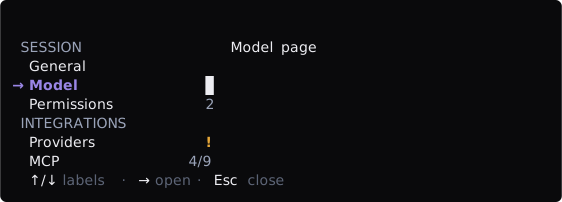
orientation: 'vertical' with groups, counts, and an attention mark, beside the page of the active label (width 64).
A rail is for many labels (sessions by workspace, settings by group). Put it in a row with basis and shrink: 0, and the pages beside it with ui.child(node, { tab }).
groupputs consecutive items under one muted, upper-cased heading. The active label carries a bold→,primarywhile the rail has focus and muted once focus is in the content. Counts and!are right-aligned.clip: 'start'keeps the distinguishing end of a long label (…ackages/mayfly); the default clips the end.↑/↓move and sendtab-changeat once, so the page follows the cursor live.→orEnterenter the content;←on the rail does nothing.- Below 60 columns of viewport the rail is drawn, and navigated, as the horizontal strip.
- The
←ladder: the focused control gets←first and keeps it only when it changes something (a select that is not on its first option, a row segment that can step down, an open tree branch, a later action in an actions row). The first←it does not use moves focus to the surface's rail, wherever the rail sits, and the hint row shows← labelsexactly then. Alt+↑/Alt+↓(F4/F5) move between controls, andAlt+←/Alt+→(F2/F3) switch tabs, from anywhere outside text editing and open pickers.Escreturns focus to the first control (Esc back) before it closes.
ui.stack.row([
  ui.child(ui.tabs({
    id: 'settings-rail',
    orientation: 'vertical',
    activeId: 'model',
    items: [
      { id: 'general', label: 'General', group: 'Session' },
      { id: 'model', label: 'Model', group: 'Session' },
      { id: 'permissions', label: 'Permissions', count: 2, group: 'Session' },
      { id: 'providers', label: 'Providers', attention: true, group: 'Integrations' },
      { id: 'mcp', label: 'MCP', count: '4/9', group: 'Integrations' },
    ],
  }), { basis: 24, shrink: 0 }),
  ui.child(ui.text('Model page'), { grow: 1, tab: { controlId: 'settings-rail', itemId: 'model' } }),
], { gap: 2 })
list

Single mode with the first item selected (width 64).
ui.list({
  id: string
  mode?: 'single' | 'multiple'
  role: 'browse' | 'choose'
  selectedIds?: readonly string[]      // default []
  items: readonly MayflyListItem[]
  filter?: string
  filterable?: boolean
  filterMode?: 'type' | 'slash'
  tree?: boolean
  numbered?: boolean | 'focus'
  minSelected?: number
  maxSelected?: number
  acceptActionId?: string
  empty?: MayflyUiNode
  marker?: 'cursor' | 'selection' | 'band'
  marks?: boolean
  maxRows?: number
  highlight?: { pattern: string, caseSensitive?: boolean }  // a regular expression drawn in reverse video wherever it matches in a row
  expandFocused?: boolean
  acceptVerb?: 'open' | 'choose' | 'expand' | 'edit' | 'restore'
  autofocus?: boolean
  focusItem?: { id: string, rev: number }
  hintLabel?: string
})

type MayflyListItem = {
  id: string
  label: string
  detail?: string
  detailSpans?: readonly MayflyInlineSpan[]
  badge?: string
  group?: string
  disabled?: boolean
  disabledReason?: string
  parentId?: string
  searchText?: string
  segment?: MayflyListSegment      // { label?, options, selectedId?, inheritedId? }
  unavailableActions?: Readonly<Record<string, string>>
  confirm?: string | MayflyConfirmation
  labelSpans?: readonly MayflyInlineSpan[]
  right?: readonly MayflyInlineSpan[]
  rightFocus?: readonly MayflyInlineSpan[]
  body?: string | MayflyListBodyNode   // built with ui.listBody(...) for content
  bodyAlways?: boolean
  bodyLead?: readonly MayflyInlineSpan[]  // with bodyAlways and a node body
  expanded?: boolean
  wrap?: boolean
  wrapMax?: number
  hang?: number
  meter?: { value: number, max: number, width?: number, tone?: MayflyTone }
  indent?: number
  rule?: string
  gap?: boolean
}
role: 'browse' opens or inspects entries; role: 'choose' submits a choice. mode defaults to single. selectedIds is optional and defaults to [] (nothing selected). Single mode permits at most one selected id, and every selected id must exist in items. detailSpans takes precedence over detail. group is a grouping heading and badge is a compact label. A renderer may hide detail at narrow widths. The screenshot above renders exactly this node:
ui.list({
  id: 'item-list',
  role: 'browse',
  selectedIds: ['one'],
  items: [
    { id: 'one', label: 'First item' },
    { id: 'two', label: 'Second item' },
  ],
})
filterable: true enables shared search, while filter supplies its initial query. Typing a character or / starts a search (with filterMode: 'slash' only / does); Escape ends it and keeps the query, and Ctrl+U clears it. Mayfly matches and focuses the supplied items without starting network work. tree: true combines with parentId for shared expansion state (Space, or Right/Left, opens and closes a branch). Large item arrays validate and render only around the current window. Empty items render the optional empty node.
Disabled rows never take the cursor; movement steps over them, and a disabled row without a detail shows its disabledReason in that place. numbered: true prefixes the first nine visible rows with 1.–9. and lets the digit choose that row; numbers follow the visible order and stay put while the list scrolls. numbered: 'focus' shows the same numbers but a digit only moves the cursor, which suits gates where accepting should take an explicit Enter.
Slash filter. filterMode: 'slash' stops printable keys from starting a search: only / does (it resumes a kept query), so bare letters stay free for accelerators such as i install or the common x delete and r refresh. Digits are text once a search is open. A tree or list that is filterable without filterMode reads every printable key as text, and the validator refuses a printable accelerator beside it; with filterMode: 'slash' on every filterable list the refusal lifts. While a search is open the filter row shows N matches, and the hint row names only what ends or clears it.
Rows. marker: 'selection' keeps a muted → on the cursor row after focus leaves the list (a rail whose detail follows it); marker: 'band' draws no arrow and paints the cursor row, with its body, in the palette's selected background while the list has focus (the conversation stream). marks: true draws ●/○ on a single choose list. maxRows windows the list around the cursor and ends it with ↑ n more · ↓ n more. acceptVerb names Enter in the hint row, hintLabel names ↑/↓, and autofocus makes the list the first control focused. focusItem moves the cursor when its rev changes (and opens the row's parents); republishing the same rev leaves a cursor the reader moved alone. expandFocused opens the cursor row's body or branch. labelSpans paint the label (label stays the plain text a filter reads), right aligns spans to the row's right edge and rightFocus replaces them under the cursor, meter draws ▰▱ cells, indent indents the row, wrap wraps the row under its own prefix (up to wrapMax lines, then ▸ N more lines · Enter; hang is the width of a glyph that leads the text, so continuation lines start under the text), and a rule or gap item is a non-selectable muted rule or blank row that the arrows skip. In a tree, * opens every branch and - closes them; a parent of a multiple tree shows ◐ when only some of its children are chosen.
Bodies. A string body opens under its row behind a │ ╰ guide; a node body (build it with ui.listBody, content only: text, rich text, fields, code, diff, sections, progress, an image, a divider) opens as content. A row with a body shows ▸/▾ and opens with Enter, Space, or Right (closes with Left); bodyAlways shows the body without a disclosure and expanded starts the row open. bodyLead (with bodyAlways and a node body) drops the row's head line: its spans follow the cursor gutter and lead the body's first row, the body takes the columns that remain, and its other rows sit under it (the stream's answer leads its Markdown with ● ). Each body admits with its item under its own budget of 32 nodes, and a long list admits only the rows around the cursor, so a stream of thousands of rich rows needs no more of the tree's quotas than plain ones. A body is never a control: a list, form, actions, or tabs node inside it is refused.
Segment strip. segment draws a horizontal option strip on the focused row only (min ‹ high (default) › max). ←/→ step it and clamp at the ends, skipping disabled options; with inheritedId, an unpinned row marks that option (default), stepping onto it unpins the row, and Delete unpins it (Delete use default in the hint row). selection-accept reports segmentId only while a row that inherits something is pinned. The strip degrades by dropping (default); when the row cannot share its line, the list reserves one footer line in advance ( Thinking: min ‹ high (default) › max, then without the caption, then folded to +N, then the active option alone), so focus never moves a row.
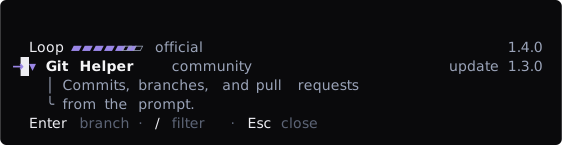
A slash list, a selection rail, right-aligned spans, a meter, and an opened body (width 64).
ui.list({
  id: 'plugins',
  role: 'browse',
  filterable: true,
  filterMode: 'slash',
  marker: 'selection',
  selectedIds: [],
  items: [
    { id: 'loop', label: 'Loop', detail: 'official', right: [{ text: '1.4.0', tone: 'muted' }], meter: { value: 3, max: 4 } },
    { id: 'git', label: 'Git Helper', detail: 'community', right: [{ text: 'update 1.3.0', tone: 'muted' }], body: 'Commits, branches, and pull requests\nfrom the prompt.' },
  ],
})
The focused row carries its strip; the right arrow pinned the next option (width 64).
ui.list({
  id: 'models',
  role: 'browse',
  acceptVerb: 'choose',
  selectedIds: [],
  items: [
    { id: 'pro', label: 'DeepSeek V4 Pro', detail: '977k context', segment: { label: 'Thinking', inheritedId: 'high', options: [{ id: 'min', label: 'min' }, { id: 'high', label: 'high' }, { id: 'max', label: 'max' }] } },
    { id: 'flash', label: 'DeepSeek V4 Flash', detail: '256k context' },
  ],
})
unavailableActions maps an action id to the reason that action cannot run while this row is the selection it targets (through the action's selections). The action then renders disabled with the reason, and Mayfly refuses it before any confirmation, so users never confirm something that would fail. confirm on a row shows the shared decision (see actions) before that single row is accepted; No leaves the selection unchanged.
Multiple mode combines with group, badge, detail, and disabled for richer pickers:
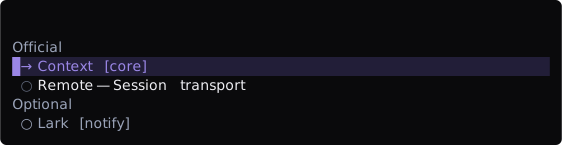
Multiple mode: two group headings, badges, a detail, and one disabled item (width 64).
ui.list({
  id: 'plugin-list',
  role: 'choose',
  mode: 'multiple',
  selectedIds: ['context'],
  items: [
    { id: 'context', label: 'Context', group: 'Official', badge: 'core' },
    { id: 'remote', label: 'Remote', group: 'Official', detail: 'Session transport' },
    { id: 'lark', label: 'Lark', group: 'Optional', badge: 'notify', disabled: true },
  ],
})
Selection changes send selection-toggle and the complete selectedIds to onEvent.observe. Explicit acceptance sends selection-accept to onEvent.action. An action may also declare selections so immutable action inputs contain the current selection with submitted forms.
form
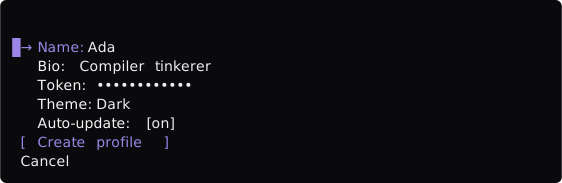
Common field kinds in their default state: the secret value is masked, the select shows its current value, and the toggle shows its switch. A form with several fields draws one primary Save; a form with a single field draws no button (width 64).
ui.form({
  id: string
  fields: readonly MayflyFormField[]
  submitActionId?: string
  submitLabel?: string
  cancelActionId?: string
  cancelLabel?: string
  enterSubmits?: string
})
A form field is this discriminated union:
kind | Required fields | Optional fields | value-change value |
|---|---|---|---|
input | id, label, value: string | placeholder, pattern, patternMessage, suggestions, error, disabled | string |
textarea | Same as input | Same as input | string |
secret | Same as input | Same as input; renderer masks value | string |
number | id, label, value: number | null | min, max, step, unit | a string draft while editing |
select | id, label, value: string | null, options: MayflyListItem[] | error, disabled | string | null |
multiselect | id, label, value: string[], options | minSelected, maxSelected | string[] |
toggle | id, label, value: boolean | error, disabled | boolean |
Every kind also takes help (one muted line under the field while it holds focus; the first thing a narrow form drops) and group (fields that share a group sit under one ── Group ── heading; a new value starts the next heading). pattern is a regular expression of at most 256 characters, compiled with the u flag and checked against a non-empty value; patternMessage words the error (a localized "Invalid value" otherwise). suggestions (at most 64 single lines) are offered while the field is edited: the first one the typed text is the start of is marked ⇥, and Tab takes it.
The screenshot above renders exactly this node:
ui.form({
  id: 'profile-form',
  fields: [
    { kind: 'input', id: 'name', label: 'Name', value: 'Ada' },
    { kind: 'textarea', id: 'bio', label: 'Bio', value: 'Compiler tinkerer' },
    { kind: 'secret', id: 'token', label: 'Token', value: 'sk-live-9f27' },
    { kind: 'select', id: 'theme', label: 'Theme', value: 'dark', options: [
      { id: 'dark', label: 'Dark' },
      { id: 'light', label: 'Light' },
    ] },
    { kind: 'toggle', id: 'updates', label: 'Auto-update', value: true },
  ],
  submitActionId: 'create-profile',
  submitLabel: 'Create profile',
})
The Mayfly frontend instance retains text drafts and sends value-change with a field revision to onEvent.observe for optional asynchronous validation. The plugin does not echo each keystroke as a snapshot. When an authoritative data snapshot changes, the model reconciles untouched values, drafts, and conflicts. Focused text fields remain in navigation until typing or Enter starts editing. Enter commits the field and moves to the next one; Alt+Enter (or Ctrl+J) inserts a textarea newline. With enterSubmits: actionId, Enter in any field of the form runs that action, including a select, a multiselect, or a toggle (Space then opens the picker or flips the switch); a form with a single field and a submitActionId submits on Enter the same way. Escape ends editing and keeps the draft; a second Escape leaves the surface. A focused textarea opens a box for its lines. A number field renders its unit after the value; while it holds focus it reads ‹ 45 › s 5–120, and Left and Right step it by step within min and max (at a limit the key goes to the control beside it).
In the form below, focusing the Name field and typing Ada Lovelace leaves a draft. The shot shows the draft text and the cursor that this interaction sequence produces:

Edit mode: the draft renders live with the cursor at the end of the text (width 64).
ui.form({
  id: 'profile-form',
  fields: [
    { kind: 'input', id: 'name', label: 'Name', value: '' },
    { kind: 'toggle', id: 'updates', label: 'Auto-update', value: true },
  ],
  submitActionId: 'create-profile',
  submitLabel: 'Create profile',
})
Left and Right change a focused select directly, stepping over disabled options (from an unset value, Right picks the first option and Left the last); Up and Down always move to the neighbouring field. Enter opens the shared option list for a select, and Enter or Space opens it for a multiselect. Inside the list, arrows move, Space toggles a multiselect option, and Enter applies. Escape discards the open list and stays on the field; Tab applies the highlighted option (or the toggled set) and moves on. An open list survives renderer rebuilds. A focused select that can cycle shows its value between the cycle markers, as in Theme: ‹ Dark ›.
In the form below, pressing Enter on the Theme field opens the option list and one Right step moves the highlight to Light:

Open option list: → marks the highlighted option, ● the current value, and ○ the others; Enter writes the highlight into the field draft (width 64).
ui.form({
  id: 'profile-form',
  fields: [
    { kind: 'input', id: 'name', label: 'Name', value: 'Ada' },
    { kind: 'select', id: 'theme', label: 'Theme', value: 'dark', options: [
      { id: 'dark', label: 'Dark' },
      { id: 'light', label: 'Light' },
    ] },
  ],
  submitActionId: 'create-profile',
  submitLabel: 'Create profile',
})
error shows a validation message under the field; disabled fields do not enter focus navigation but remain in the submitted form. Required, length, numeric, pattern, and selection constraints run before an action starts. Once a value was edited and the edit is over (Enter, Tab, or Escape), a broken constraint shows as ! message under its field; a field never scolds while it is being typed into. A refused save marks every invalid field, says "Fix the highlighted fields", and leaves the focus where it is (an error on another page of the surface brings that page forward). The form below shows both states:
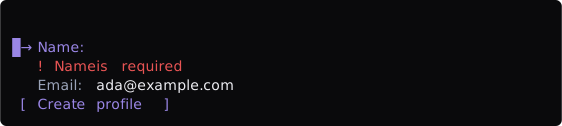
Name carries an error message; Email is disabled and skipped by focus navigation (width 64).
ui.form({
  id: 'profile-form',
  fields: [
    { kind: 'input', id: 'name', label: 'Name', value: '', error: 'Name is required' },
    { kind: 'input', id: 'email', label: 'Email', value: 'ada@example.com', disabled: true },
  ],
  submitActionId: 'create-profile',
  submitLabel: 'Create profile',
})
origin: 'inherited' | 'explicit' adds (inherited) or (override) after the value; editing an inherited value overrides it. A field that differs from its default, or has been edited, carries a • in place of the arrow column. resetValue makes a changed or overriding field resettable: Delete on that field returns it to resetValue (the inherited value when the field has an origin), and the submitted field reports change: 'reset'. Without a resetValue, Delete returns an edited field to the value it opened with. The hint row shows Delete only while a reset would change something; forms render no separate override or reset buttons. A secret whose stored value is untouched reads •••• (saved). A field whose authoritative value changed under a draft asks for Use current value or Keep my changes before the form can be saved.
In the form below, the Endpoint field holds focus, so its help line shows:
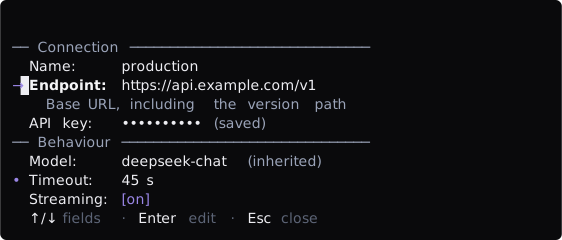
Two groups under ── Group ── headings. The focused field shows its help; the secret reads (saved), Model reads (inherited), and Timeout differs from its resetValue, so it carries • (width 64).
ui.form({
  id: 'provider-form',
  fields: [
    { kind: 'input', id: 'name', label: 'Name', value: 'production', group: 'Connection' },
    { kind: 'input', id: 'endpoint', label: 'Endpoint', value: 'https://api.example.com/v1', help: 'Base URL, including the version path',
      pattern: '^https?://\\S+$', patternMessage: 'Must be an http(s) URL' },
    { kind: 'secret', id: 'key', label: 'API key', value: 'sk-live-0123456789' },
    { kind: 'select', id: 'model', label: 'Model', value: 'deepseek-chat', origin: 'inherited', group: 'Behaviour', options: [
      { id: 'deepseek-chat', label: 'deepseek-chat' },
      { id: 'deepseek-reasoner', label: 'deepseek-reasoner' },
    ] },
    { kind: 'number', id: 'timeout', label: 'Timeout', value: 45, resetValue: 30, min: 5, max: 120, step: 5, unit: 's' },
    { kind: 'toggle', id: 'stream', label: 'Streaming', value: true },
  ],
  submitActionId: 'save',
})
While any form on a surface holds an unsaved edit, the surface head carries an unsaved changes badge after the badges the author gave it. Ctrl+S (ui.save) submits the form from any of its fields: through its submitActionId, the action enterSubmits names, or else the action that submits the form (a primary one first).
submitActionId adds one primary submit control labelled submitLabel (a localized "Save" when omitted) to a form with more than one field; the id is never shown. A form with a single field draws no button: Enter submits it. An action's declared submit addresses collect one or more forms across pages and lock that action boundary:
{
  kind: 'submit',
  controlId: form.id,
  pagePath: [],
  submission: {
    actionId: 'save',
    draftRevision: number,
    source: [{ resourceId: 'settings', revision: 3 }],
    forms: [{ pagePath: [], formId: form.id, draftRevision: number, fields: [
      { id: 'name', change: 'set', value: 'Ada' },
    ] }],
  },
}
cancelActionId is never drawn as a button: the outermost Escape runs it, and it closes the surface. A dirty form first opens the default-No discard decision. With no onUnhandledEscape from the host, the hint row words Escape as cancel. Close actions never navigate back; Escape owns Back.
actions

The three intents: primary, secondary, and a danger item carrying a confirm prompt (width 64).
ui.actions({
  id: string
  scope?: string | readonly string[]   // controls whose focus puts the group's keys in effect
  items: readonly {
    id: string
    label: string
    intent?: 'primary' | 'secondary' | 'danger'
    disabled?: boolean
    disabledReason?: string
    busy?: boolean
    confirm?: string | MayflyConfirmation
    submit?: readonly MayflyFormAddress[]
    read?: readonly MayflyFormAddress[]
    selections?: readonly MayflySelectionAddress[]
    defaultFocus?: boolean
    hidden?: boolean          // no button, no focus stop; runs from `key` or as a form `enterSubmits` target
    dismiss?: boolean
    navigate?: MayflyPagePath
    key?: string              // with `action`, that action's default key
    semantic?: 'save' | 'copy' | 'delete' | 'refresh' | 'external' | 'search'
    action?: string           // `<owner>.<action>`; `ui.*` is reserved
    hintLabel?: string
  }[]
})

type MayflyConfirmation = {
  title: string
  detail?: string
  confirmLabel?: string
  cancelLabel?: string
  tone?: 'danger'
}
Activating an enabled item sends activate with actionId, controlId, and pagePath to onEvent.action. Disabled and busy items cannot activate; busy also communicates in-progress presentation and keeps the cursor on the running action. A disabled item shows its disabledReason next to its label. An action with confirm requires explicit Yes in a shared default-No decision; Escape, Ctrl+C, or No returns to the original surface. A structured confirm adds a detail sentence about the consequences, custom confirmLabel/cancelLabel button text, and tone: 'danger'; the order is always No first (focused), then Yes. Use it instead of drawing your own Yes/No overlay.
key declares an accelerator that fires the action while the surface has focus. It must be a key id (ctrl+r, alt+enter, f5, q); the shared navigation keys (Enter, Escape, Tab, Shift+Tab, Space, arrows, Page/Home/End, Alt+Left/Right, Backspace, Ctrl+C, Ctrl+E, Ctrl+U) are reserved; a key may be bound once per page; and a printable key is rejected on a surface that contains a filterable list, where it would swallow typed filter text. Printable keys never fire while a text field is focused — typing starts editing instead. Modifier accelerators keep working while a list filter is active. intent communicates semantic priority; the theme owns its appearance. The outer actions.id identifies the group, while an event's controlId is the activated item's id. Both screenshots render exactly this node:
ui.actions({
  id: 'session-actions',
  items: [
    { id: 'save', label: 'Save', intent: 'primary' },
    { id: 'archive', label: 'Archive', intent: 'secondary' },
    { id: 'discard', label: 'Discard', intent: 'danger', confirm: 'Discard all changes?' },
  ],
})
Enter on the danger item opens the shared Yes/No decision with No focused. Only Yes emits the original action:

Pending confirmation: Discard all changes? is a shared default-No decision (width 64).
busy marks an in-progress action and disabled an unavailable one; neither can activate:

The busy item shows an in-progress ellipsis; the disabled item stays visible but cannot activate (width 64).
ui.actions({
  id: 'session-actions',
  items: [
    { id: 'deploy', label: 'Deploy', intent: 'primary', busy: true },
    { id: 'retry', label: 'Retry', disabled: true },
    { id: 'cancel', label: 'Cancel' },
  ],
})
A row operation can name what it means instead of which key it uses. semantic declares a common meaning, and the item runs from that meaning's current binding: delete is x until a user rebinds ui.delete, and then every panel's delete moves at once. A meaning carries neither key nor action, and its default key counts for the page rules above, so copy (c), delete (x), and refresh (r) are refused beside a type-to-filter list. action names a component action, <owner>.<action> (the ui.* namespace belongs to core), with key as its default; Mayfly lists the actions it has seen so a user can rebind them, and the hint row and the button follow the effective key. hintLabel is the word the hint row shows after the key (the label otherwise).
scope names one or more controls on the same page or an enclosing one: the group's keys act, and show their hints, only while one of them, or a row, field, or tab inside it, has focus. Two groups may bind the same key on a page only when their scopes name different controls. The list below answers x and t only while it has focus:

A hidden common meaning and a component action, scoped to the list they act on (width 64).
ui.stack.column([
  ui.list({ id: 'providers', role: 'browse', selectedIds: [], items: [
    { id: 'production', label: 'production', detail: 'api.example.com' },
    { id: 'staging', label: 'staging', detail: 'staging.example.com' },
  ] }),
  ui.actions({ id: 'provider-keys', scope: 'providers', items: [
    { id: 'remove', label: 'Remove', semantic: 'delete', hidden: true, hintLabel: 'remove', confirm: 'Remove the provider?' },
    { id: 'test', label: 'Test connection', action: 'acme-providers.test', key: 't', hidden: true, hintLabel: 'test' },
  ] }),
])
prompt

A prompt with two tokens and a typed draft, in the right-titled surface the editor uses (width 64).
ui.prompt(options: {
  id: string
  symbol?: string                      // default '> '
  symbolTone?: MayflyTone
  value?: string                       // the draft the control starts with
  tokens?: { id: string, label: string, size?: string }[]
  recall?: { text: string }[]          // history, newest first
  recallLabel?: string                 // default 'history'
  placeholder?: string | string[]      // a ladder, longest first
  completions?: { items: { id: string, label: string, detail?: string, right?: string }[] }
  reset?: { rev: number, value: string }
  submitLabel?: string                 // default 'send'
  autofocus?: boolean
})
The prompt is the one text control that is not a field. The first row holds the symbol, the tokens, and the buffer; the buffer is the terminal editor, so the kill ring, undo, paste folding, and input methods behave as they do in the main editor. A token reads [label size ×] and is inverse while selected. Later lines of a multi-line buffer sit under the symbol. Core keeps the draft in the surface model, so a republish, a theme switch, or a core reload never loses what was typed; the node's value is only where the draft starts.
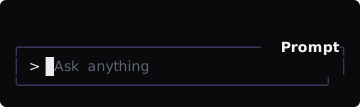
The longest placeholder variant that fits shows (width 40).
While the buffer and the tokens are empty, the placeholder shows after the cursor in the muted text tone. An array is a ladder, longest first; the longest variant that fits shows, so write whole triggers in each variant. A plain string degrades by dropping its last · segment. The placeholder is hidden for any text, token, or multi-line buffer, and a very narrow row cuts only the shortest variant.
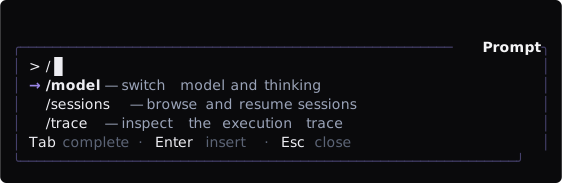
An open completion list and its key line (width 64).
completions shows up to five rows under the buffer, → label — detail, the focused row bold and right (such as a command's key) at the edge when it fits. ↑/↓ move the cursor, Tab or Enter send completion-accept with the row's itemId, and Esc hides the list (completion-dismiss) until the rows or the text change. The host inserts the result by publishing a new node, usually with a reset. Put the prompt in a surface with hint: 'completions' to show the key line only while a list is open.

↑ twice on an empty prompt (width 64).
recall is walked with ↑/↓ while the buffer is empty or already a recalled entry, newest first; the right corner reads ↑ history 2/3 and the recalled text becomes the draft. ↓ past the newest returns the draft that was there before. Each step sends the observation recall-change (source history or draft, and the index into recall, -1 for the draft). A host that withdraws a recalled entry republishes recall without it; the walk keeps its place.
Keys while the prompt has focus:
| Key | Does |
|---|---|
typing, ←/→, Home/End, Ctrl+K, Ctrl+Y, … | The terminal editor's own editing |
Enter | Sends: the submit action |
Alt+Enter, Ctrl+J | Inserts a line break |
Backspace on an empty buffer | The first press selects the last token, the second removes it (token-remove); any other key deselects |
↑ / ↓ on an empty buffer | Walk recall |
Tab / Enter / Esc / ↑ / ↓ with a completion list open | Accept, accept, hide, move |
Esc, Ctrl+C | Leave the surface, as for any control |
Printable keys always go to the buffer, so a letter accelerator elsewhere on the surface never fires while the prompt has focus; modifier accelerators still do. The hint row names Enter with submitLabel, Alt+Enter newline, and the recall pair while it applies.
Events: value-change (observation; formId is the prompt id and controlId is text), recall-change (observation), and the actions token-remove (tokenId), completion-accept (itemId), completion-dismiss, and submit. A submit carries a submission with one form addressed by the prompt id and the fields text and tokens (the token ids); the draft is cleared at once, and the host replies as for a form, normally accepted with the new node (cleared tokens, an updated recall). reset replaces the draft once for each new rev; it is how the host inserts a completion or restores a draft.
Limits: a draft, a recalled message, a reset, and form text values share 100,000 characters per tree; at most 50 tokens (id, label, and size up to 64 characters), 8 placeholder variants of up to 200 characters, a symbol of up to 8 characters, and 24 for recallLabel and submitLabel. prompt is available in panes and overlays. It is not a status or editor-extension node.
Focus and contextual hints
The TUI derives operations directly from canonical control roles through one key grammar, and generates the hint row from the same grammar. Plugins should not repeat generic keyboard teaching in a surface footer:
- Tab/Shift-Tab moves between control groups (from a tab strip it descends into the active page's content), remembering the last focused item in each group, and commits text and open pickers on the way. Inside a form or action row it steps control by control.
- Up/Down move between rows and fields and never change a value. Left/Right move along action rows and tab strips, adjust a focused select or row segment, and open or close tree branches. Alt+Left/Right switch tabs from anywhere; in a wizard, moving forward validates the step being left.
- Movement does not wrap, and disabled items never receive focus. Single lists activate with Enter; multiple lists toggle with Space and confirm with Enter; actions accept Enter or Space.
- Escape leaves one layer per press, identically on every surface: an open picker is cancelled, text editing ends (the draft stays), an active search ends (the query stays), a page with a
backIdgoes back, focus returns to the surface's first control (Esc back), and then the surface closes. Tab strips are not a stop. Ctrl+C requests the same close. - A pending confirmation changes the hint to
Enter confirm · Esc cancel. Read-only scroll regions are focusable, support arrows, Page, Home, and End, and Ctrl+E expands them to the full frame.
The row appears only while a plugin pane owns focus or a capturing overlay is open, and lists only keys that act in the current state. Escape is always included when it does something; passive panes and non-capturing overlays do not show a false operation. Up to three fragments are shown below 80 columns and four from 80. Narrow layouts first use complete compact key tokens, then remove whole fragments rather than clipping half an instruction. Local counts, progress, risk, and business status still belong in the footer.
Arm delay for overlays that open unprompted
An overlay a plugin opens without the user asking for it (an approval, a plan review, a permission request) can land under keys the user was already typing. Set armMs on the definition (an integer from 0 to 2000, default 0) and, for that many milliseconds after the overlay first takes focus, every key except Escape is swallowed: a stray 1 or Enter chooses, grants, and submits nothing. The hint row shows … ready in a moment until the window closes, then the surface behaves as usual. The delay is a fixed wall-clock window; reduced motion does not shorten it. Escape still dismisses, because a dismissal never grants. Use about 300 ms for a decision card; leave armMs unset for a surface the user opened on purpose.
api.overlays.open({ id: 'acme.approve', presentation: 'editor', capturing: true, armMs: 300 }, card)Feedback and utility nodes
loader

The default gap variant with the elapsed hint and the Esc cancel hint (width 64).
ui.loader({
  message?: string
  variant?: 'bloom' | 'fill' | 'gap' | 'breath' | 'pulse'
  elapsedMs?: number
  cancelActionId?: string
  cancelLabel?: string
})
variant defaults to gap. Without a message the node is a bare glyph. elapsedMs is a non-negative millisecond hint, shown as 45s, 2m 10s, or 1h 5m. The renderer owns the animation, one clock for every surface at a 100 ms step: bloom (· ✢ ✳ ✶ ✻ ✽), fill (a braille bar that fills and drains), and gap (a braille spinner) step each tick, and breath is a ● that moves through six shades of the primary tone, dim to bright to dim, a shade every 400 ms (pulse is the same breath on a small •). Never start a timer in render(). Reduced motion freezes every variant on its first frame, and ASCII glyphs draw - \ | /. A cancelActionId is a hint, not a button: the row Esc cancel (or Esc and the lower-cased cancelLabel) sits under the loader, Esc emits activate for that action before it leaves the surface, and Enter on the focused row does too. The screenshot above renders exactly this node:
ui.loader({
  message: 'Waiting for model',
  elapsedMs: 1200,
  cancelActionId: 'stop',
  cancelLabel: 'Stop',
})
All four variants, each at its first frame:
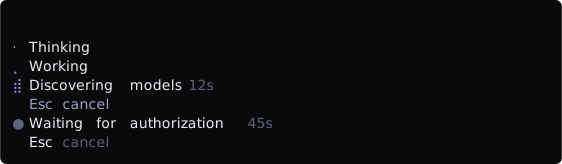
bloom, fill, gap, and breath (width 64).
ui.stack.column([
  ui.loader({ variant: 'bloom', message: 'Thinking' }),
  ui.loader({ variant: 'fill', message: 'Working' }),
  ui.loader({ variant: 'gap', message: 'Discovering models', elapsedMs: 12_000, cancelActionId: 'stop' }),
  ui.loader({ variant: 'breath', message: 'Waiting for authorization', elapsedMs: 45_000 }),
])
empty

A no-data state with the actions slot filled (width 64).
ui.empty({
  title: string
  description?: string
  actions?: MayflyActionsNode
})
Represents an empty result or no-data state. actions must be the result of ui.actions(). The screenshot above renders exactly this node:
ui.empty({
  title: 'No sessions yet',
  description: 'Start one to see it here.',
  actions: ui.actions({
    id: 'empty-actions',
    items: [{ id: 'new', label: 'New session', intent: 'primary' }],
  }),
})
progress

A determinate bar with label and count (width 64).
ui.progress({
  label?: string
  value: number
  max: number
  style?: 'cells' | 'rule'
  width?: number
  tone?: MayflyTone
  showCount?: boolean
  showPercent?: boolean
  transition?: { from: number, ms: number, rev: number }
})
value is a non-negative integer and max is an integer of at least 1. Host admission clamps a value above max to max. At narrow widths a renderer may hide the label or count while preserving the progress meaning. The screenshot above renders exactly this node:
ui.progress({ label: 'Tokens', value: 12_000, max: 28_000 })A bar that names neither style nor width fills its row with partial blocks, as above. Naming either chooses the kit look: style: 'cells' (the default then) draws ▰ for done and ▱ for what is left in width cells (10), with a label, n/N (turn it off with showCount: false), and showPercent. style: 'rule' draws the heading rule, ━ for done and ─ for what is left in width cells (24), with nothing after it. tone colors the done part (primary by default). transition is a renderer-owned one-shot: when its rev first arrives, the bar drains linearly from from to value over ms on the animation clock, then stays still; reduced motion, or no clock, shows value at once. A status node takes no transition:

Cells with a count, cells with a percentage, and the heading rule (width 64).
ui.stack.column([
  ui.progress({ label: 'Building', value: 6, max: 10, style: 'cells', width: 10 }),
  ui.progress({ value: 9, max: 10, width: 10, showCount: false, showPercent: true }),
  ui.progress({ style: 'rule', value: 2, max: 8, width: 24 }),
])
spacer
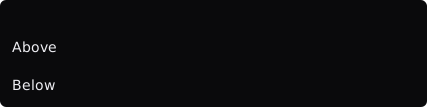
One row of semantic whitespace between two text anchors (width 48).
ui.spacer(options?: { size?: 1 | 2 })Inserts semantic spacing and defaults to size 1. Do not simulate layout with a text node full of spaces. ui.spacer() alone produces only blank rows, so the shot clamps it between two text anchors — it renders exactly this node:
ui.stack.column([
  ui.text('Above'),
  ui.spacer(),
  ui.text('Below'),
])
divider

A divider without a label (width 48).
ui.divider(options?: { label?: string })Inserts a semantic divider with an optional label. The renderer draws it at the assigned width. The screenshot above renders exactly this node:
ui.divider()image

An image whose bytes have not arrived, shown as its alt (width 48).
ui.image(options: { attachmentId: string, alt: string, maxRows?: number })Keeps an image inline. The wire carries a reference, never bytes: the host tree supplies a loader that resolves attachmentId to the encoded bytes and their media type, and the renderer draws the image through the terminal's image protocol, at most maxRows rows tall. alt is the text fallback, for example [Image #1 84 KB]; it shows until the bytes arrive, when no loader knows the id, and on a terminal without an image protocol. It is one muted row, truncated to the assigned width.
image is available in ordinary panes and overlays. It is not a status, editor-extension, or sections.body node. The screenshot above renders exactly this node, with no loader in the screenshot host:
ui.image({ attachmentId: 'att-1', alt: '[Image #1 84 KB]', maxRows: 12 })Views of the status row
A pane with placement: 'views' is a view: an item of the status row (<mark> <name> <n/m> <timer>, such as ● todo 2/12 4m 12s) that opens its own panel. The lane has no rows of its own. Each summary joins the one status row beside the status entries; while a view is entered the row stays as it is, a heavy ━ line is drawn under the words of its item (the row's second line), and the panel opens under the row.
export const inject = ['mayflyPanes']

export function apply(ctx: Context): void {
  const full = ui.richText([{ text: '● ', tone: 'accent' }, { text: 'builds ', tone: 'muted' }, { text: '2 ' }, { text: '3m 12s', tone: 'muted' }])
  const view = ctx.mayflyPanes.register({
    id: 'acme.builds',
    placement: 'views',
    priority: 50,             // lower comes first in the row
    // The time is the first thing a crowded row gives up.
    summary: { node: ui.shed(full, [{ rank: 5, node: ui.richText([{ text: '● builds 2' }]) }]) },
    onEvent: { action: () => ({ kind: 'completed' }) },
  }, ui.list({ id: 'builds', role: 'browse', selectedIds: [], items: [{ id: 'main', label: 'main' }] }))

  // The row updates without republishing the panel; null takes the view out of the row.
  view.setSummary({ node: ui.richText([{ text: '● builds 1' }]) })
  view.setSummary(null)
}
The item of the example view, as it sits in the status row (width 48).
| Field | Rule |
|---|---|
summary.node | A passive status node (text, richText, fields, progress, a stack of them, or ui.shed(full, narrower)), admitted like any status entry; one row, no motion |
summary.node as ui.shed | The narrower forms (each at a rank 0 to 1000, null hides the item) are given up in rank order, lowest first across the whole row, before the row admits by priority |
size, narrow | Do not apply; a views pane that sets either is refused |
summary on another placement | Refused; only a views pane has a summary or setSummary |
set(node) publishes the panel; onEvent, load, refresh, and loadMore work as for any pane, and an action in the panel reaches the onEvent of the view it was taken in. A view with no summary is absent from the row; a view with a summary but no panel yet shows in the row and cannot be entered. The panel opens under the row and takes at most a third of the terminal's rows (at least four); with more than one view its hint row names ←/→ items. A panel that is a fixed ui.scroll(…, { expandable: false, more: true }) has no Ctrl+E and counts the rows still below on its last row (↓ 6 more); a list row can line its columns up with the other rows through cells.
| Key | Effect |
|---|---|
Alt+↓ or F5 on an empty prompt | Enter the first view |
F6 / Shift+F6 | Enter the views first, then walk the interactive panes; crossing an end returns to the prompt |
← / → | Switch items (a field being edited keeps its arrows) |
Esc | Return to the prompt after the panel has left its own layers |
These are the named actions ui.focus-next, ui.left/ui.right, and ui.cancel, so a rebinding moves them and their hints. See the ui-gallery example for a working view.
Patterns
patterns (from @ephemeral-ai/mayfly-ui) holds four compositions of the builders that Mayfly's own panels use and a plugin can call the same way. A pattern is a pure function: it returns an ordinary, deeply frozen node made only of ui.* calls, has no renderer of its own, and publishes nothing, so the result goes wherever a node goes (a pane, an overlay's snapshot, a reply's node). Its props are the real builders' shapes: list items, spans, and tab items are the ones documented above, and a pattern never reads a width.
patterns.decisionPanel
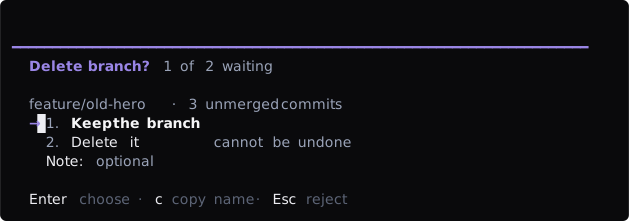
A decision with a preview, choices, a note, and a hidden key (width 72).
patterns.decisionPanel(props: {
  id?: string                       // the controls' prefix, default 'decision'
  title: string
  badges?: MayflyInlineSpan[]
  preview?: MayflyUiNode[]          // read-only context above the choices
  options: MayflyListItem[]
  input?: { id: string, label: string, placeholder?: string }
  instant?: boolean                 // a digit chooses even beside the note field
  accelerators?: Omit<MayflyActionItem, 'hidden'>[]
  escapeLabel?: 'close' | 'back' | 'cancel' | 'reject' | 'leave'   // default 'reject'
  chrome?: 'none' | 'lane' | 'surface' | 'overlay'                  // default 'overlay'
}): MayflySurfaceNode
An overlay-chrome surface whose column holds the preview nodes, a focused choose list (<id>.options, numbered), an optional one-line form (<id>.input), and an actions node (<id>.keys) whose items are all hidden. The first option is the common grant and holds the cursor, so Enter takes it; a digit chooses by position (while the list holds focus, or anywhere with instant); Esc rejects. An accelerator runs from anywhere on the panel except while the note field holds focus, where its key is the field's text. The choice arrives as a selection-accept event carrying the option id.
Open it with the arm delay when it appears unprompted: patterns.decisionArmMs is 300, so a stray 1 or Enter typed into the editor as the card opens chooses nothing (see Arm delay above).
patterns.decisionPanel({
  title: 'Delete branch?',
  badges: [{ text: '1 of 2 waiting', tone: 'muted' }],
  preview: [ui.text('feature/old-hero · 3 unmerged commits', { tone: 'muted' })],
  options: [
    { id: 'keep', label: 'Keep the branch' },
    { id: 'delete', label: 'Delete it', detail: 'cannot be undone' },
  ],
  input: { id: 'why', label: 'Note', placeholder: 'optional' },
  accelerators: [{ id: 'copy', label: 'Copy name', key: 'c', hintLabel: 'copy name' }],
})api.overlays.open({ id: 'acme.delete', presentation: 'editor', capturing: true, armMs: patterns.decisionArmMs }, card)patterns.railPanel
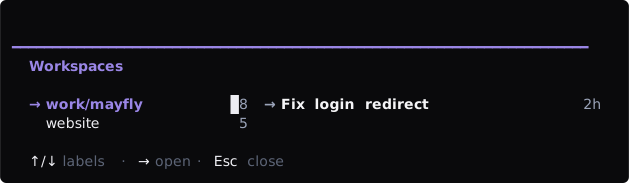
A rail of workspaces and the live list of the active one (width 72).
patterns.railPanel(props: {
  title: string
  badges?: MayflyInlineSpan[]
  rail: { id: string, activeId: string, items: MayflyTabItem[], hintLabel?: string }
  content: MayflyUiNode | Record<string, MayflyUiNode>
  railWidth?: number                // default 26
  escapeLabel?: 'close' | 'back' | 'cancel' | 'reject' | 'leave'
}): MayflySurfaceNode
A vertical tabs rail (railWidth columns, never shrunk) beside the content, two columns apart. A record keyed by rail item id gives every label its own page, linked to the rail with tab, so the rail switches pages without a republish and each page keeps its own cursor and draft. A single node is the content of the active label; the plugin rebuilds it from the tab-change event.
patterns.railPanel({
  title: 'Workspaces',
  rail: { id: 'rail', activeId: 'work', items: [
    { id: 'work', label: 'work/mayfly', count: 8 },
    { id: 'site', label: 'website', count: 5 },
  ] },
  content: {
    work: ui.list({ id: 'ws.work', role: 'browse', marker: 'selection', selectedIds: [], items: [{ id: 'a', label: 'Fix login redirect', right: [{ text: '2h', tone: 'muted' }] }] }),
    site: ui.list({ id: 'ws.site', role: 'browse', marker: 'selection', selectedIds: [], items: [{ id: 'b', label: 'Docs sync', right: [{ text: '1d', tone: 'muted' }] }] }),
  },
})
patterns.splitView
patterns.splitView(props: {
  list: MayflyUiNode
  detail: MayflyUiNode
  listWidth?: number                // default 58
  breakpoint?: number               // default 100
}): MayflyStackNode
A row that shows the list (listWidth columns) and the detail side by side from breakpoint columns, and the list alone below it. The list node is placed twice under complementary when conditions, so one id serves both layouts and the cursor survives a resize. Wrap the result in a stack.column or a surface when the page needs a heading. Follow the cursor with the focus-change observation to keep the detail current. The screenshots of this document cannot draw when children; the ui-gallery example mounts the pattern in a pane.
patterns.splitView({
  list: ui.list({ id: 'sv', role: 'browse', marker: 'selection', selectedIds: [], items: [
    { id: 'a', label: 'Loop', detail: 'official', right: [{ text: '1.4.0', tone: 'muted' }] },
    { id: 'b', label: 'Git Helper', detail: 'community', right: [{ text: 'update 1.3.0', tone: 'muted' }] },
  ] }),
  detail: ui.fields([
    { label: 'Name', value: [{ text: 'Loop' }] },
    { label: 'Status', value: [{ text: '✓ installed 1.4.0', tone: 'success' }] },
  ]),
})
patterns.statusPage
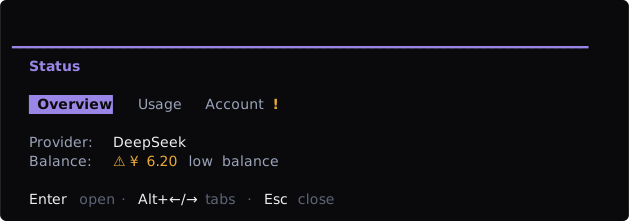
A read-only page under three tabs (width 72).
patterns.statusPage(props: {
  title: string
  badges?: MayflyInlineSpan[]
  tabs: Omit<MayflyTabsNode, 'kind'>
  rows?: MayflyField[]              // the key/value rows
  body?: MayflyUiNode               // in place of the rows
  pages?: Record<string, MayflyUiNode>   // one page per tab id
  footer?: MayflyUiNode
}): MayflySurfaceNode
An overlay-chrome surface with a tab strip, a blank row, and the page. Give it rows, a body, or pages; a call with none throws a TypeError. As with the rail, pages links one node to each tab so the strip switches them without a republish, while rows and body are rebuilt by the plugin on tab-change.
patterns.statusPage({
  title: 'Status',
  tabs: { id: 'st', activeId: 'overview', items: [
    { id: 'overview', label: 'Overview' },
    { id: 'usage', label: 'Usage' },
    { id: 'account', label: 'Account', attention: true },
  ] },
  rows: [
    { label: 'Provider', value: [{ text: 'DeepSeek' }] },
    { label: 'Balance', value: [{ text: '⚠ ¥ 6.20', tone: 'warning' }, { text: ' low balance', tone: 'muted' }] },
  ],
})
Events and snapshot updates
Panes, overlays, and editor extensions place the handler on the definition, not on an individual node:
onEvent: {
  observe(event: MayflyUiObservationEvent, context: MayflyUiEventContext) {
    return { kind: 'completed' }
  },
  async action(event: MayflyUiActionEvent, context: MayflyUiEventContext) {
    return { kind: 'completed' }
  },
}| Channel | Events | Purpose |
|---|---|---|
observe | value-change, selection-toggle, tab-change, focus-change, recall-change | Editing facts, async validation, and focus moves (focus-change carries controlId and itemId?, at most once per frame); cannot publish, navigate, or dismiss |
action | activate, selection-accept, submit, token-remove, completion-accept, completion-dismiss, dismiss | Native effects and explicit settlement |
context carries surfaceId, current source stamps, revision, a unique operationId, AbortSignal, and report(feedback). Observations are latest-wins per field; each action boundary is single-flight. Replacement, unload, or abort revokes late handlers, progress reports, and publishers.
Actions return a structured reply. accepted carries the authoritative node and source; invalid carries field errors; conflict retains drafts against a new baseline; failed may include partially accepted field addresses; completed and cancelled publish no snapshot. Replies may also carry feedback, semantic navigate, and successful dismiss. Core admits the reply and then invokes its one-use publisher, so the handler does not call set() to acknowledge its own action.
When an external projection, service subscription, or timer changes domain state, call set(node, { reason: 'data', source }) on a pane/overlay handle or the corresponding editor-extension set(). A new instance or scope uses reason: 'replace'. Callers cannot publish acknowledgements, and there is no eventRevision compatibility argument.
Surface compatibility matrix
| Surface | Allowed nodes | Interaction rule |
|---|---|---|
panes | Full MayflyUiNode | Controls work and events go to pane onEvent |
panes with placement: 'views' | Full MayflyUiNode for the panel; a status node (or a shed node) for the summary | The panel opens under the status row while entered; the summary is passive |
| Capturing overlay | Full MayflyUiNode | Receives focus and handles Escape dismissal |
| Non-capturing overlay | Passive content/layout only | Tabs/list/form/actions/prompt controls replace the whole render tree with an error message |
Additive status | text, rich-text, fields, progress, recursive stack | Always passive; no surface, scroll, or controls |
| Editor extension | Passive content/rich-text/progress/spacer/divider plus stack/surface | Interactive actions use the extension decoration's actions field |
All four registries are direct Fiber-owned Cordis services; no secondary manifest or capability host participates in registration.
Validation checklist
- Exercise every content and responsive branch at 120, 80, and 40 columns; never rely on an absolute coordinate.
- Cover disabled, busy, empty, error, loading, abort, and capability-absent fallback states.
- Cover consumer unload, owner reload, late event results, and overlay dismiss.
- Run the package validator, packed fixture, and width scan described in Testing and validation.