

Slash commands reference
Typing / triggers fuzzy autocomplete and discovery hints (see Input editor); the /help overlay lists registered commands live — if anything differs, trust /help.
Built-in commands
| Command | Aliases | Arguments | Description | Source |
|---|---|---|---|---|
/quit | /q /exit | — | Exit Mayfly | mayfly-commands |
/new | /clear | [preset] | Return to the start screen; the next message creates the new session (optionally under a chosen agent preset) | mayfly-commands |
/fork | — | — | Fork the current session into a new one | mayfly-commands |
/rewind | — | — | Create a safe branch from an earlier user turn | mayfly-commands |
/sessions | /resume | [<session-id>] | Browse sessions by workspace (cwd), then open a conversation; an id resumes directly | mayfly-commands |
/rename | — | [<name>] | Rename the current session (no name opens an editor) | mayfly-commands |
/btw | — | <question> | Create a temporary side Agent and switch the complete UI to it; empty input closes | mayfly-btw-command |
/agents | — | [stop <id>] | Browse the subagent tree, view a child, or stop a continuable child | mayfly-agents-command |
/jobs | — | — | Browse the current Agent's background jobs (list, detail, Read output) | mayfly-jobs |
/help | — | — | Show available commands and key bindings | mayfly-commands |
/mode | — | — | Toggle plan mode (same as Shift+Tab) | mayfly-commands |
/model | — | [id] | Switch the session model (no argument opens the picker) | mayfly-commands (model-commands) |
/effort | /thinking | [level] | Switch the thinking effort (no argument opens the selector) | mayfly-commands (model-commands) |
/provider | — | [list | switch <name> | add] | List providers, switch the route, or add one | mayfly-commands (model-commands) |
/preset | — | [name] | List agent presets or switch (blank sessions only) | mayfly-commands (preset-commands) |
/permission | — | [name] | Native permission command: list or switch the sandbox/approval preset | dsh-permission-presets (native) |
/permissions | — | — | Open Mayfly's permission-preset panel for the current Agent | mayfly-commands (permission-panel) |
/tools | — | — | List the tools visible to the current session | mayfly-commands (tools-commands) |
/mcp | — | — | Browse the MCP servers the host connects to and their tools | mayfly-commands (mcp-commands, S34) |
/skills | — | — | List available skills (the # prompt invokes one) | mayfly-commands (skills-command) |
/theme | see Theming | List or switch themes | mayfly-commands (theme-switch) | |
/init | — | — | Analyze the codebase and write AGENTS.md | mayfly-commands (session-init) |
/stats | — | — | Show this session, the history of your sessions (activity heatmap, streaks), and the usage and cost per model | mayfly-commands (stats-command) |
/context | — | — | Show token usage and the context window | mayfly-commands (session-commands) |
/version | — | — | Show the Mayfly and harness versions and the live model | mayfly-commands (session-commands) |
/changelog | — | — | Show the release changelog (what's new, one section per release, the running version badged · current) | mayfly-commands (session-commands) |
/trace | — | [copy <seq> | copy all] | Inspect the current session's execution timeline; copy one item or the full trace | mayfly-commands (trace-command) |
/update | — | [version] | Safely update Mayfly (pre-flight, snapshot, boot smoke, automatic rollback; a bare call is a read-only check) | mayfly-commands (update-command, D52) |
/settings | — | — | Edit user settings by namespace (two-level panel, every change writes through; see Configuration) | mayfly-commands (settings-command) |
/plugin | — | [install <id> [--source npm|github] | uninstall <id> | info <id> | list | refresh] | Browse, install, and remove marketplace plugins (official, dsh, and community tiers; cache-first with stale serving offline; see the marketplace repository) | mayfly-commands (plugin-commands) |
/save | — | [full] [<path>] | Save the current session as a Markdown file (the projected transcript, or the full event stream with full) | mayfly-commands (session-export) |
/copy | — | — | Copy the last assistant message to the clipboard | mayfly-commands (session-export) |
Sessions and models
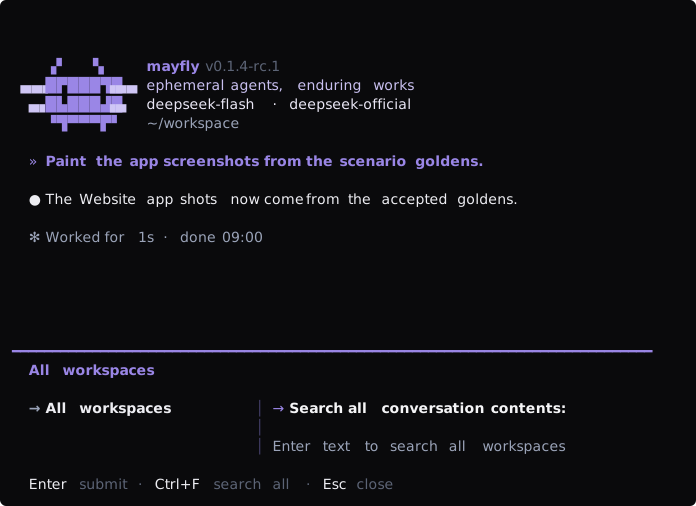
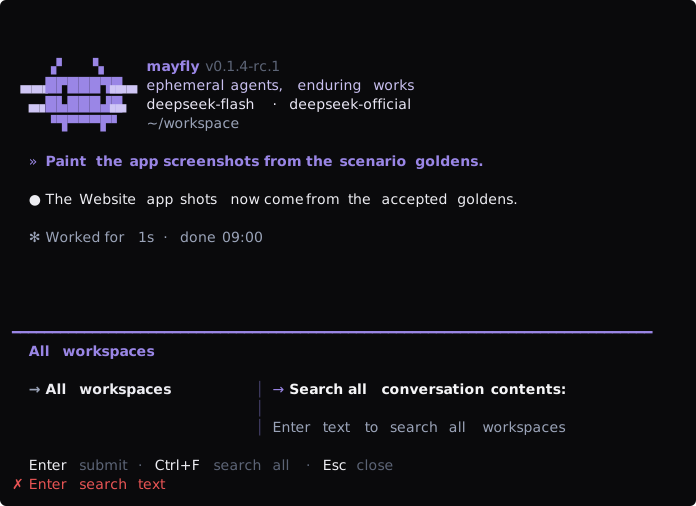
/sessions//resume <session-id>—/resumeis the alias of/sessions: with an id it resumes directly; without one it lists native workspaces grouped by the Workspace registry. The workspace holding the displayed conversation appears first, and each row shows its session count. Type to filter paths, then press Enter to browse that workspace.The workspace panel reads the native Session Controller catalog: names, status badges (
current,running,archived,Reminders,migration required), the title/model/usage hints a summary carries, and a lineage tree for sessions in that workspace. Type to filter names or IDs. Enter opens details with Open/Archive/Restore actions. Amigration-requiredsession shows its cached values and a notice; Mayfly never starts migration on its own. Workspaces or Escape returns after editing/filtering ends; failed reads show a refresh hint.Search contents inside a workspace searches that directory's conversations. Search all contents on the workspace picker searches across directories. Content search requires the native Harness search capability.
/rename [<name>]— rename the current session: an argument renames directly, a bare call opens a one-field editor prefilled with the current name. A user name pins the title, so automatic titling no longer replaces it; the name shows on the editor's top border and in/sessions./fork— returnscannot fork while the agent is runningwhile the agent is not idle./rewind— lists the current session's direct user turns in one level. Selecting a turn creates an ordinary child session from the complete boundary before it; the parent is never truncated or deleted and remains resumable through/sessions. A running agent is refused./btw//agents— open side conversations beside main; several can stay open, and a new BTW replaces the previous one. Every conversation renders in the transcript pane: a live BTW/continuable child drives the complete layout and editor, while a one-shot or cold child is read from native history and markedread-onlyorreply to resume. The status bar explicitly showsF7 switch · F8 close./agents stop <id>accepts only live continuable children without live descendants, while browser stops require selecting Yes in a Yes / No confirmation; cold/inactive children are not falsely reported as stopped, and parents must be stopped leaf-first so Harness recursive teardown cannot widen the operation./model//effort— no argument opens the model picker or horizontal effort selector. Non-wrapping←→moves provider/effort tabs,Enterdescends, and content-level Tab reaches actions.EntercommitsSet as default: switch and persist as the new default. With an argument they switch directly and persist. The panel-free shortcutAlt+Mcycles through the current provider's models (draft preserved; see the key reference)./provider— three subcommands:listshows providers and the current route;switch <name>switches;addstarts the add-provider flow./preset— switches the agent composition over the thin-host roster (upstreamstandard/minimal/ptc/cordis, plus Mayflymayfly-cordis): a session's tool surface, persona, and plan mode come from its preset. There is nocodealias. Switching is allowed only on blank sessions — a started one returnscannot switch presets: this session has already started (blank sessions only). Reminder tools (schedule_*) are preset-scoped:standard,ptc,cordis, andmayfly-cordismounttool-schedule;minimalomits it. The Host-widescheduleservice is inserted disabled, so enable that row in profile files to use reminders at all.
Modes and approval
Shift+Tabplan toggle: normal ↔ plan, executing only/planor/plan off. Enter YOLO with/permission danger-full-accessand exit it with/permission workspace-write; YOLO can remain active alongside plan (see Session modes). Mayfly does not register/yoloor/yes./permission— the native command lists/switches permission presets (named bundles of sandbox mode + approval policy) and keeps its name and argument form. Mayfly's/permissionsopens the same single-select panel shape as/presetfor the current Agent; a danger preset opens a Yes / No confirmation with No focused initially./mcp— a three-level panel browsing the MCP servers the host connects to: server picker → server panel (a config pseudo-row + raw tool rows) → detail (config status / redacted connection / policy, or a tool's schema). Read-only — servers are added via profile patch (see dsh/mcp); the empty state points the way./init— the agent analyzes the codebase and writesAGENTS.mdin the project root: if one exists it is read first, still-accurate content carries forward, and the file is rewritten into one coherent, up-to-date document (not appended), in the language the project's own docs mainly use.
Info and saving
/save [full] [<path>]— saves the current session as Markdown: the projected transcript by default, or the full event stream withfull; without a path it writes the default filenamemayfly-export-{id8}-{YYYYMMDD-HHMMSS}.md./copy— the last assistant message's text goes to the clipboard: OSC 52 first (the escape sequence travels over stdout to the local terminal emulator, so SSH sessions still reach the local clipboard), with a fallback pipeline behind it./trace— reads the current execution timeline through the harness's official session query; Up/Down selects an item, Enter opens full JSON, PageUp/PageDown scrolls details,ccopies one item, andacopies the complete trace./theme— full usageusage: /theme [<theme>|auto|custom <path> [<base theme>]], see Theming./quit— before the agent attaches it showsno active session(see the FAQ).
Commands never enter a model turn — success/error text flashes on the editor hint line. Commands registered by downstream plugins through ctx.commands appear automatically in the completion menu and /help; aliases are not registered as commands — the input layer rewrites them to the canonical name before dispatch (the kimi aliases port). /permission is the native command registered by dsh-permission-presets; Mayfly adds /permissions as a separate panel name, so neither command shadows the other.
Parked commands
These commands exist in the reference products (kimi/Claude Code); Mayfly deliberately parks them — waiting on upstream primitives or real demand (the full rulings live in the repository roadmap's parked ledger):
/reload/tasks— deferred (task management goes through profile/config files)/archive/delete— upstream persistence has no delete/archive primitive yet/import— session-format version strictness undecided/diff(uncommitted-changes panel) and the full-screen approval diff preview — re-evaluated with dogfood feedback after release/debug— needs an upstream diagnostics-export surface
After installing the Agent Team plugin and selecting its team preset, /team inspects the readonly roster and task board. /schedule lists the current Agent's native session reminders (overdue first, readonly; the Host schedule service is enabled in profile files and the preset's tool-schedule row supplies the reminder tools). /files opens recorded file deliveries. Cold continuable child history offers i to reply through the native child address; browsing does not activate it. See Team configuration.